- Stripe
- SaaS
- Subscriptions
- Billing
- Prorations
- Engineering
Architecting Robust Subscription Changes: Handling Prorations and Billing Cycles in SaaS
Implementing Stripe subscriptions is one thing; gracefully managing mid-cycle plan changes, prorations, and billing cycle anchors is another.
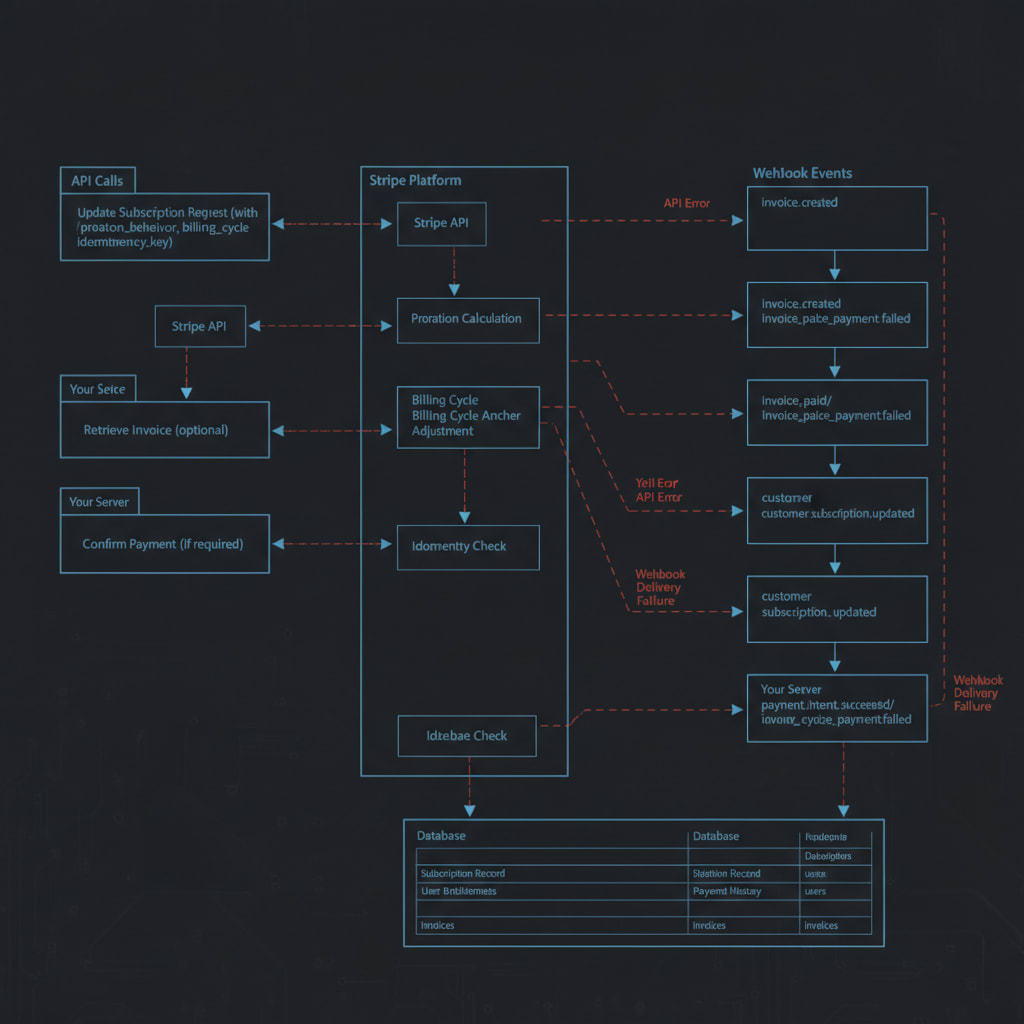
You've shipped your SaaS product with Stripe subscriptions, but now your users want to upgrade, downgrade, or change plans mid-billing cycle. How do you handle prorations, ensure accurate billing, and manage billing cycle anchors without introducing reconciliation nightmares or customer support headaches? This is a common, high-stakes problem for SaaS CTOs, technical founders, and senior developers who've moved beyond basic recurring billing and are now grappling with the complexities of a flexible, user-centric subscription model. It's where the rubber meets the road for robust payments engineering.
TL;DR
- Stripe handles prorations automatically, but understanding
proration_behavioris crucial for desired outcomes. billing_cycle_anchorensures predictable future billing dates, simplifying user communication and internal reconciliation.- Implement robust API request handling, including idempotency keys, to prevent race conditions and ensure data consistency.
- Always treat Stripe as the source of truth, reconciling your local subscription state via webhooks.
- Design for comprehensive error paths and clear user-facing communication during subscription changes.
The Subscription Change Headache: Why It's Harder Than It Looks
Initial Stripe integration for recurring billing is often straightforward. You create a customer, attach a payment method, and subscribe them to a price. But the real engineering challenge begins when users want flexibility. They might need to upgrade to a higher tier, downgrade to save costs, or switch between annual and monthly billing. Each of these actions can trigger prorations – credits or charges for the unused or newly used portions of a billing period – and can shift their billing cycle anchor, leading to confusion for both your users and your internal systems.
Without careful implementation, these changes can lead to:
- Inaccurate Billing: Overcharging or undercharging users due to incorrect proration calculations.
- Reconciliation Nightmares: Discrepancies between your database and Stripe's records, causing auditing headaches.
- Poor User Experience: Unclear charges, unexpected billing dates, or failed subscription changes.
- Race Conditions: Concurrent updates leading to inconsistent states or lost changes.
This article will guide you through architecting a robust solution for managing these complex scenarios, leveraging Stripe's powerful API features.
Understanding Stripe's Proration Mechanics
Stripe's API provides granular control over how prorations are handled when a subscription changes. The proration_behavior parameter is your primary tool here, dictating how and when any prorated amounts are invoiced.
proration_behavior Options:
-
always_invoice(Default): This is the most common and often simplest option. When you update a subscription withproration_behavior: 'always_invoice', Stripe immediately calculates any prorated credits or charges and creates an invoice for the difference. If there's a net charge, Stripe attempts to collect payment immediately using the customer's default payment method. If there's a net credit, it will be applied to the customer's credit balance and used against future invoices.- When to use: Ideal for most direct upgrades/downgrades where you want immediate financial settlement for the change.
-
create_prorations: With this setting, Stripe calculates the prorated amounts and adds them as line items to the customer's next invoice, but does not immediately create or finalize an invoice. This is useful in scenarios where you want to combine multiple changes into a single invoice, or if you have complex billing logic that requires custom invoice finalization.- When to use: For advanced scenarios, such as when you're manually creating invoices, or when you want to bundle proration charges with other one-off items on a future invoice.
-
none: This option tells Stripe to ignore prorations entirely. When a subscription changes, the new plan's billing simply starts from the next billing cycle, with no adjustments for the current period's usage of the old plan.- When to use: Rarely for plan changes, but can be useful if you have very specific, non-standard billing policies or are managing prorations entirely outside of Stripe (which is generally not recommended).
For most production SaaS applications, always_invoice provides the best balance of automation and clarity, ensuring that any financial adjustments for the plan change are handled immediately and transparently by Stripe.
Anchoring the Future: billing_cycle_anchor
Beyond prorations, managing the billing_cycle_anchor is crucial for predictable billing. This parameter determines when a customer's subscription period begins and ends. When a subscription changes, you have options for how the billing cycle continues:
unchanged(Default): The subscription maintains its current billing cycle anchor. If a user was billed on the 15th of each month, they will continue to be billed on the 15th, regardless of when they changed plans. This is generally preferred for continuity and user predictability.now: The subscription's billing cycle immediately resets. The current moment becomes the newbilling_cycle_anchor, and the user is billed for a full new period starting from the change date. Any prorations for the old plan would still apply.- Specific Timestamp: You can provide a Unix timestamp to set a future date as the new
billing_cycle_anchor. This is less common for simple plan changes but offers maximum flexibility.
For most subscription changes, unchanged is the safest and most user-friendly default. It prevents unexpected shifts in billing dates, which can be a source of confusion and support tickets. However, if a user explicitly requests to reset their billing cycle (e.g., to align with a specific budget cycle), now or a specific timestamp can be appropriate.
Implementing a Robust Subscription Update Flow
Let's walk through a practical example using a Next.js App Router API route and the Stripe Node.js library. This example assumes you have a userId from an authentication system (like Clerk) and a local database (db) for optimistic updates.
// app/api/stripe/update-subscription/route.ts
import { NextRequest, NextResponse } from 'next/server';
import Stripe from 'stripe';
import { getAuth } from '@clerk/nextjs/server'; // Example auth, use your preferred method
import { db } from '@/lib/db'; // Your ORM/DB client for local state updates

const stripe = new Stripe(process.env.STRIPE_SECRET_KEY!, {
  apiVersion: '2023-10-16', // Ensure this matches your Stripe account's API version
  typescript: true,
});

export async function POST(req: NextRequest) {
  const { userId } = getAuth(req); // Retrieve authenticated user ID
  if (!userId) {
    return NextResponse.json({ error: 'Unauthorized' }, { status: 401 });
  }

  const { subscriptionId, newPriceId, prorationBehavior, billingCycleAnchor } = await req.json();

  if (!subscriptionId || !newPriceId) {
    return NextResponse.json({ error: 'Missing required parameters' }, { status: 400 });
  }

  try {
    // 1. Fetch current subscription to get the existing item ID.
    // This is crucial for updating existing items rather than adding new ones.
    const currentSubscription = await stripe.subscriptions.retrieve(subscriptionId);
    const currentSubscriptionItem = currentSubscription.items.data[0]; // Assuming single-item subscription

    if (!currentSubscriptionItem) {
        return NextResponse.json({ error: 'Subscription item not found' }, { status: 404 });
    }

    // 2. Update the subscription with the new price and desired behaviors.
    const updatedSubscription = await stripe.subscriptions.update(subscriptionId, {
      items: [
        {
          id: currentSubscriptionItem.id, // Reference the existing subscription item
          price: newPriceId, // Set the new price for this item
        },
      ],
      proration_behavior: prorationBehavior || 'always_invoice', // Default to immediate proration
      billing_cycle_anchor: billingCycleAnchor || 'unchanged', // Default to maintaining current anchor
      expand: ['latest_invoice.payment_intent'], // Useful for immediate UI feedback on payment status
    }, {
      // 3. Add an idempotency key to prevent duplicate requests from causing issues.
      // This is crucial for client-side retries or network glitches, ensuring the operation is processed only once.
      idempotencyKey: `${subscriptionId}-${newPriceId}-${Date.now()}`,
    });

    // 4. Optional: Optimistically update your local database.
    // This improves UX by showing the new plan immediately. However, the ultimate
    // source of truth should be confirmed by a webhook (customer.subscription.updated).
    await db.userSubscription.update({
      where: { userId }, // Ensure this update is tenant-scoped
      data: {
        stripePriceId: newPriceId,
        stripeSubscriptionStatus: updatedSubscription.status,
        // ... other relevant fields like current_period_end
      },
    });

    // 5. Return success response with updated subscription details.
    return NextResponse.json({
      success: true,
      subscription: updatedSubscription,
      invoice: updatedSubscription.latest_invoice,
    });

  } catch (error: any) {
    console.error('Error updating subscription:', error);
    // 6. Handle Stripe-specific errors and provide useful feedback.
    return NextResponse.json({
      error: error.message || 'Failed to update subscription',
      stripeError: error.raw, // Include raw Stripe error for debugging
    }, { status: error.statusCode || 500 });
  }
}
This snippet demonstrates a core update. Remember to replace getAuth and db with your actual authentication and database clients. The idempotencyKey is a critical detail for robust production systems, ensuring that if a network request is retried, Stripe only processes the operation once.
Production Edge Cases and Considerations
Building a robust subscription management system means thinking beyond the happy path. Here are critical edge cases a senior engineer cares about:
1. Race Conditions and Concurrent Updates
What happens if a user attempts to upgrade and downgrade simultaneously, or if two different processes try to modify the same subscription? Stripe's API operations are atomic for a single request, meaning subscriptions.update will either succeed entirely or fail. However, your surrounding application logic can still introduce race conditions.
- Mitigation: Implement client-side UI locking to prevent rapid, conflicting user actions. On the server, ensure your
subscriptions.updatecall is the single source of truth. If you have complex workflows involving multiple Stripe API calls for a single user action, consider using a queueing system (e.g., BullMQ, Faktory) to process these actions sequentially for a givensubscriptionIdoruserId. - Idempotency Keys: While the
subscriptions.updateoperation is inherently idempotent for a given request, providing a uniqueidempotencyKeyfor each distinct user action (e.g., combiningsubscriptionId,newPriceId, and a timestamp) helps ensure that network retries don't inadvertently re-apply the same change or cause unexpected side effects.
2. Webhook Reconciliation: The Ultimate Source of Truth
Never rely solely on the immediate API response for critical state changes in your local database. Network issues can prevent you from receiving the response, or subsequent Stripe actions (like a failed payment for a prorated invoice) could alter the subscription status.
- Key Webhooks: Listen for
customer.subscription.updatedto confirm plan changes, status changes, and newcurrent_period_enddates. Also, monitorinvoice.payment_succeededandinvoice.payment_failedfor prorated invoices generated by the subscription change. These webhooks provide the definitive state from Stripe. - Eventual Consistency: Your local database should achieve eventual consistency with Stripe. Optimistic updates improve UX, but the webhook handler should be responsible for the final, authoritative state update in your system.
3. Failed Payments and Refund Paths
If an upgrade triggers an always_invoice proration that results in a charge, what if the payment fails? Stripe will handle retries according to your dunning settings. Your UI needs to reflect the pending payment or failed status.
- Error Handling: Present clear messages to the user if a payment for a proration fails. Guide them to update their payment method.
- Refunds: Design clear paths for support teams or automated processes to issue refunds if a user accidentally upgrades or if a service issue warrants it. Stripe's API allows for refunding specific charges or invoice line items.
4. User Experience and Communication
Billing changes can be a source of anxiety for users. Clear, upfront communication is paramount.
- Transparency: Clearly explain the immediate charge (proration) and the new billing date/amount. Show
Last updated October 26, 2026
Get thoughtful updates
Join our monthly digest for founders and builders.