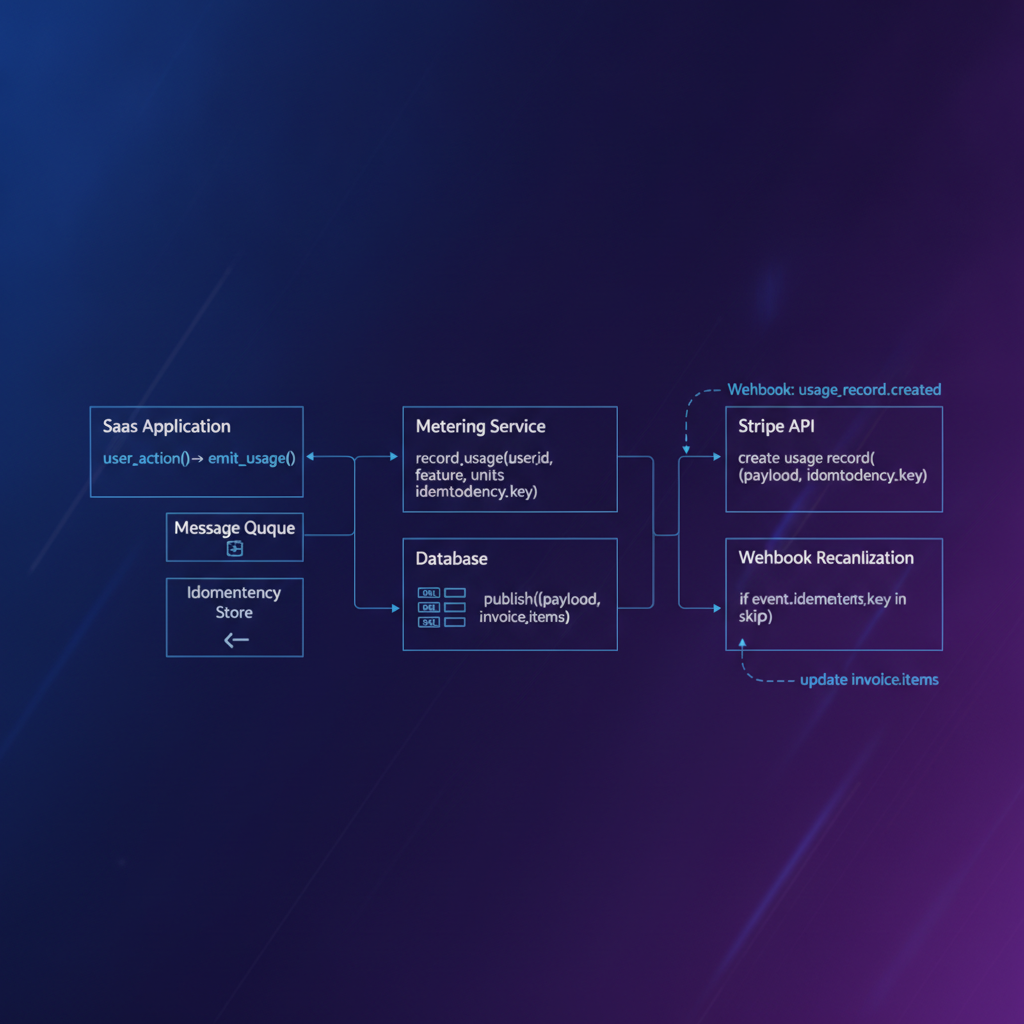
Beyond Flat Fees: Architecting Production-Grade Usage-Based Billing with Stripe
For technical founders, CTOs, and senior engineers building SaaS platforms, the transition from simple flat-fee or tiered subscriptions to a usage-based billing model often presents significant engineering challenges. You've likely hit the ceiling of what basic subscription APIs can offer, realizing that your product's value scales directly with how much your users consume—be it API calls, storage, processing time, or data transfer. The problem isn't just about integrating Stripe; it's about architecting a system that accurately tracks, reports, and bills for usage at scale, while gracefully handling the inevitable production edge cases.
This article addresses the core complexities of implementing production-grade usage-based billing with Stripe. We'll move beyond the basics, focusing on the architectural considerations and specific Stripe API patterns required to build a system that is accurate, resilient, and scalable. If you're grappling with how to reliably meter consumption, reconcile billing discrepancies, or ensure data integrity in a high-throughput environment, you're in the right place.
TL;DR
- Accurate Metering is Key: Design a robust, distributed usage tracking system within your application. Normalize usage data before reporting to Stripe.
- Stripe's
Subscription ItemsandUsage Records: Leverage these APIs to report metered usage. Understand theactionparameter (incrementvs.set) andtimestamp. - Idempotency is Non-Negotiable: Implement idempotency keys for all usage reporting to prevent double-billing, especially with retry mechanisms.
- Webhook Reconciliation: Use Stripe webhooks (e.g.,
invoice.created,invoice.paid) to reconcile reported usage with actual billed amounts, catching discrepancies early. - Error Handling and Adjustments: Plan for usage adjustments, credits, and refunds through Stripe's API to maintain customer trust and financial accuracy.
The Core Challenge: Accurate Metering
Before you even touch the Stripe API, the most critical component of usage-based billing is your internal metering system. This is where most production issues originate. You need a reliable, high-performance mechanism to capture every unit of usage from every customer.
Designing Your Metering System
Your metering system should be decoupled from your billing system. It needs to:
- Capture Raw Events: Log every relevant action (e.g., API call, data upload) with granular detail, including user ID, tenant ID, event type, quantity, and timestamp.
- Aggregate Usage: Periodically aggregate these raw events into billable units. This might involve summing quantities, calculating durations, or applying specific pricing logic.
- Store Aggregated Data: Persist this aggregated usage data in a way that allows for easy retrieval and reconciliation. A time-series database or a dedicated usage table in your primary database is often suitable.
- Handle Retries and Deduplication: Your metering system must be resilient to transient errors and ensure that usage is counted exactly once, even if events are processed multiple times.
Consider a scenario where you're billing for API requests. Each request hitting your service should generate a usage event. A dedicated message queue (like Kafka or RabbitMQ) can buffer these events, allowing a separate worker process to consume, aggregate, and store them. This separation prevents your core application from being bogged down by billing concerns and provides a robust foundation for eventual consistency.
Reporting Usage to Stripe: Subscription Items and Usage Records
Once you have reliable aggregated usage data, the next step is to report it to Stripe. This is done through the Subscription Items API, specifically by creating Usage Records for metered pricing tiers.
Understanding Metered Pricing
In Stripe, usage-based billing relies on a metered pricing model. When you create a product and a pricing plan (Price object), you specify billing_scheme: 'per_unit' and usage_type: 'metered'. You also define tiers if your pricing has volume discounts or different rates for different usage ranges.
Each Subscription in Stripe has one or more Subscription Items, each corresponding to a specific Price. For a metered price, you'll report usage against its associated Subscription Item.
Creating Usage Records
To report usage, you'll use the stripe.subscriptionItems.createUsageRecord method. This method takes three key parameters:
subscriptionItem: The ID of theSubscription Itemto which the usage applies.quantity: The amount of usage to report.timestamp: (Optional) The time at which the usage occurred. Crucial for accurate billing periods.action: (incrementorset) Determines how the reported quantity interacts with previous reports.incrementadds to the current total for the billing period, whilesetoverwrites it. For most real-time usage reporting,incrementis the default and often preferred.
Here's a TypeScript example using the stripe-node library:
import Stripe from 'stripe';

const stripe = new Stripe(process.env.STRIPE_SECRET_KEY!, {
  apiVersion: '2023-10-16',
});

interface UsageReportPayload {
  subscriptionItemId: string;
  quantity: number;
  timestamp?: number; // Unix timestamp in seconds
  idempotencyKey: string; // Unique key for each usage report
}

/**
 * Reports usage to Stripe for a specific subscription item.
 * Implements idempotency to prevent duplicate usage reports.
 */
async function reportUsageToStripe(payload: UsageReportPayload): Promise<Stripe.UsageRecord | null> {
  const { subscriptionItemId, quantity, timestamp, idempotencyKey } = payload;

  try {
    // Stripe recommends using a unique key for each usage report
    // to prevent duplicate records in case of network issues or retries.
    // The idempotency key ensures that if the same request is sent multiple times,
    // Stripe processes it only once.
    const usageRecord = await stripe.subscriptionItems.createUsageRecord(
      subscriptionItemId,
      {
        quantity,
        timestamp: timestamp || Math.floor(Date.now() / 1000), // Default to now if not provided
        action: 'increment', // Add to the current total for the billing period
      },
      {
        idempotencyKey: `usage-report-${idempotencyKey}`,
      }
    );
    console.log(`Successfully reported usage: ${usageRecord.id}`);
    return usageRecord;
  } catch (error: any) {
    if (error.type === 'StripeIdempotencyError') {
      console.warn(`Idempotency key ${idempotencyKey} already processed. Skipping duplicate report.`);
      // Depending on your error handling, you might want to fetch the existing record
      // or simply acknowledge that it was processed.
      return null;
    } else {
      console.error(`Error reporting usage to Stripe for item ${subscriptionItemId}:`, error.message);
      throw error; // Re-throw to handle upstream
    }
  }
}

// Example usage:
// const examplePayload = {
//   subscriptionItemId: 'si_12345ABCDEF',
//   quantity: 100,
//   timestamp: Math.floor(Date.now() / 1000),
//   idempotencyKey: 'user123-api-calls-20231027-1000',
// };
// reportUsageToStripe(examplePayload);
Production Edge Case: Idempotency for Usage Reporting
This is perhaps the most critical production consideration for usage-based billing. Network issues, retries, or distributed system complexities can lead to the same usage report being sent to Stripe multiple times. Without idempotency, this results in double-billing and angry customers.
Stripe's API supports idempotency keys, which are unique values you provide with each request. If Stripe receives a request with an idempotency key it has already processed, it will return the result of the original request without re-executing the operation. For createUsageRecord, this is essential.
Strategy:
- Generate a unique, deterministic idempotency key for each logical usage report. A good key might combine the user ID, subscription item ID, a timestamp (or batch ID), and the specific usage metric (e.g.,
userId-subscriptionItemId-timestamp-metricName). - Store this idempotency key alongside your aggregated usage data in your internal system. Before reporting usage, check if a record with that key has already been successfully sent to Stripe.
- Always include the
idempotencyKeyoption in yourstripe.subscriptionItems.createUsageRecordcall, as shown in the code snippet.
Handling Billing Cycles and Proration
Stripe automatically aggregates all Usage Records for a given Subscription Item within the current billing cycle. At the end of the cycle, it generates an invoice that includes the total usage for each metered item.
Proration
If a customer changes their subscription mid-cycle (e.g., upgrades to a different plan with a new metered price), Stripe will automatically prorate the usage. This means they'll only be billed for the usage on the old plan up to the change, and for usage on the new plan from the change onwards. While Stripe handles the mechanics, your internal systems need to be aware of these changes to ensure you're reporting usage against the correct Subscription Item at any given time.
Webhook Reconciliation: Trust, But Verify
While Stripe handles the billing, you, as the platform owner, are ultimately responsible for the financial accuracy and customer experience. This means you cannot simply fire-and-forget usage reports. You need a reconciliation process, primarily driven by Stripe webhooks.
Essential Webhooks for Usage-Based Billing
invoice.created: This webhook fires when Stripe creates an invoice, typically at the end of a billing cycle. This is your opportunity to compare theamount_dueandlines(which detail usage for each item) in the invoice against your internally tracked usage. Look for discrepancies.invoice.paid: Confirms that an invoice has been successfully paid. Update your internal records to reflect this.invoice.payment_failed: Indicates a payment failure. Trigger dunning processes or restrict service as appropriate.customer.subscription.updated: Crucial for detecting changes to subscription items, especially when a customer changes plans. Your system needs to know whichSubscription Itemto report usage against.
Reconciliation Strategy
Upon receiving invoice.created, your system should:
- Retrieve Invoice Details: Fetch the full invoice object from Stripe using the
idprovided in the webhook payload. - Extract Usage: Iterate through
invoice.lines.datato findSubscription Itemsassociated with metered prices. Extract thequantityandamountbilled for each. - Compare with Internal Records: Match these billed quantities against your internal aggregated usage for the corresponding billing period and customer. If there's a significant discrepancy, flag it for manual review or automated correction.
This reconciliation step is your safety net. It catches issues stemming from missed usage reports, incorrect timestamp values, or even Stripe's internal processing errors (though rare). For a deeper dive into robust webhook handling, consider our guide on Lemon Squeezy Webhooks Next.js Complete Guide, which shares many principles applicable to Stripe.
Production Edge Case: Race Conditions and Eventual Consistency
In a distributed system, usage events can arrive out of order or concurrently. While Stripe's increment action handles concurrent createUsageRecord calls reasonably well by adding to the total, ensuring your internal metering system is eventually consistent is paramount.
Strategy:
- Event Sourcing: Consider an event-sourcing pattern where every usage event is an immutable record. Aggregation can then be replayed or processed asynchronously.
- Atomic Updates: When updating aggregated usage counters in your database, use atomic operations (e.g.,
UPDATE ... SET count = count + X WHERE ...) to prevent lost updates from concurrent writes. - Batching Usage Reports: For high-volume usage, consider batching usage reports to Stripe. Instead of reporting every single API call, aggregate usage for a short period (e.g., every minute) and send a single
createUsageRecordcall with the total. This reduces API call overhead and simplifies idempotency keys.
Error and Refund Paths: Correcting Mistakes
No system is perfect, and you'll inevitably need to adjust usage or issue refunds.
Adjusting Usage
Stripe doesn't provide a direct API to