- Stripe
- Billing
- SaaS
- Subscriptions
- Prorations
- Payments
Mastering Subscription Prorations: Handling Complex Billing Changes in Production
For technical founders and CTOs building SaaS, managing subscription upgrades, downgrades, and plan changes often hits a wall with proration complexities.
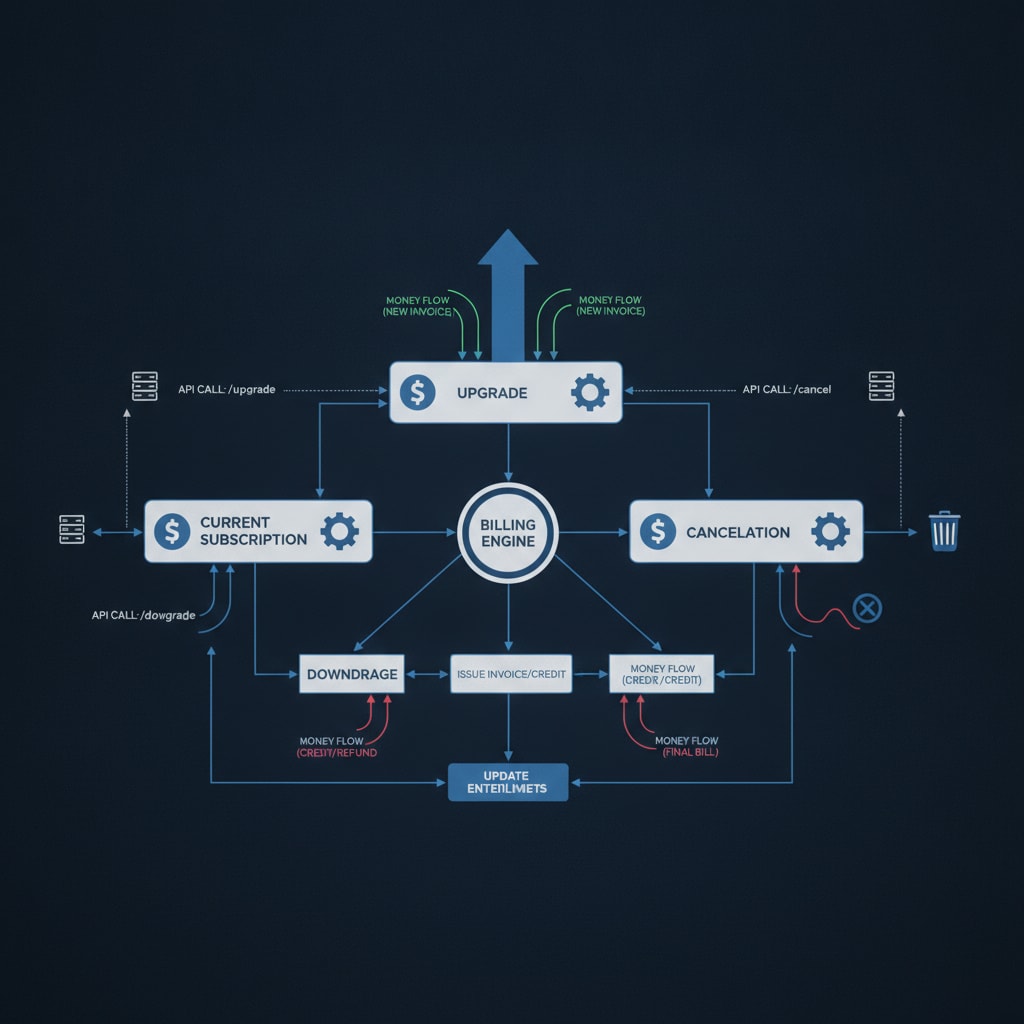
You've shipped your SaaS, users are converting, and now they want to upgrade, downgrade, or change plans mid-billing cycle. What seems like a straightforward Stripe.subscriptions.update call quickly unravels into a labyrinth of proration calculations, race conditions, and webhook event ordering. This isn't a beginner's problem; it's a production edge case that can lead to incorrect billing, customer churn, and a support nightmare. If you've found yourself wrestling with customer.subscription.updated events and wondering why your database state doesn't match Stripe's, you're in the right place.
TL;DR
- Prorations are critical for accurate billing during subscription changes but introduce significant complexity.
- Implement robust webhook handling for
customer.subscription.updatedevents, focusing on idempotency and eventual consistency. - Guard against race conditions by using optimistic locking or transaction-based updates when modifying subscription states.
- Always verify proration behavior in Stripe's test mode, especially for complex scenarios like multiple plan changes within a single billing period.
- Ensure your UI accurately reflects the prorated charges and credits before confirming a plan change.
The Proration Conundrum: More Than Just a Math Problem
Prorations are Stripe's mechanism for adjusting charges when a subscription changes mid-billing cycle. If a user upgrades, they pay a prorated amount for the new plan for the remainder of the current cycle and receive a credit for the unused portion of their old plan. Downgrades typically result in a credit applied to their next invoice. Sounds simple, right? The challenge isn't the math itself, but reliably reflecting these changes in your application's state and ensuring consistency across systems.
Why Prorations Break Production Systems
Many engineers, after implementing basic subscription creation, assume plan changes are just another API call. The reality is that Stripe.subscriptions.update can trigger a cascade of events, and your system needs to be ready for them:
- Race Conditions: A user might initiate an upgrade, then immediately downgrade before the first update fully processes. Your backend needs to handle these concurrent updates gracefully.
- Webhook Event Ordering: While Stripe generally sends webhooks in order, network latency or processing delays can mean
customer.subscription.updatedevents arrive out of sequence or are retried, leading to stale data if not handled idempotently. - State Synchronization: Your internal representation of a user's subscription (e.g., in Supabase) must eventually match Stripe's source of truth. Discrepancies lead to incorrect feature access, billing errors, and customer frustration.
- Edge Cases: Free trials, coupons, usage-based components, and custom billing cycles all add layers of complexity to proration calculations.
Architecting for Robustness: Webhooks and Idempotency
The customer.subscription.updated webhook event is your primary signal for changes to a subscription. Relying solely on the direct API response from Stripe.subscriptions.update is a common pitfall. The API response confirms the initiation of the update, but the final state and any related events (like invoice creation or credit application) are best confirmed via webhooks.
Idempotent Webhook Handling
Every webhook handler should be idempotent. This means processing the same event multiple times has the same effect as processing it once. For subscription updates, this is critical. Stripe retries webhook deliveries, and network issues can cause duplicates.
// app/api/stripe-webhooks/route.ts (Next.js App Router)

import Stripe from 'stripe';
import { headers } from 'next/headers';
import { buffer } from 'micro'; // Or your preferred body parser
import { createClient } from '@supabase/supabase-js';

const stripe = new Stripe(process.env.STRIPE_SECRET_KEY!, {
  apiVersion: '2023-10-16',
});

// Initialize Supabase client
const supabase = createClient(
  process.env.NEXT_PUBLIC_SUPABASE_URL!,
  process.env.SUPABASE_SERVICE_ROLE_KEY!
);

export async function POST(req: Request) {
  const rawBody = await buffer(req); // Read raw body for Stripe signature verification
  const signature = headers().get('stripe-signature');

  let event: Stripe.Event;

  try {
    event = stripe.webhooks.constructEvent(
      rawBody,
      signature!,
      process.env.STRIPE_WEBHOOK_SECRET! // Your webhook secret
    );
  } catch (err: any) {
    console.error(`Webhook signature verification failed: ${err.message}`);
    return new Response(`Webhook Error: ${err.message}`, { status: 400 });
  }

  // Check if the event has already been processed using a unique event ID
  const { data: existingEvent, error: fetchError } = await supabase
    .from('processed_stripe_events')
    .select('id')
    .eq('event_id', event.id)
    .single();

  if (fetchError && fetchError.code !== 'PGRST116') { // PGRST116 means no rows found
    console.error('Database error checking event:', fetchError);
    return new Response('Internal Server Error', { status: 500 });
  }

  if (existingEvent) {
    console.log(`Skipping duplicate event: ${event.id}`);
    return new Response(JSON.stringify({ received: true }), { status: 200 });
  }

  // Store the event ID before processing to prevent race conditions on subsequent retries
  const { error: insertError } = await supabase
    .from('processed_stripe_events')
    .insert({ event_id: event.id, created_at: new Date().toISOString() });

  if (insertError) {
    // This might happen if two webhook deliveries arrive almost simultaneously
    // and both try to insert. The unique constraint on event_id will prevent true duplicates.
    // We can safely assume if insert fails due to unique constraint, another process is handling it.
    if (insertError.code === '23505') { // Unique violation error code
      console.warn(`Race condition detected for event ${event.id}, another process is likely handling it.`);
      return new Response(JSON.stringify({ received: true }), { status: 200 });
    } else {
      console.error('Error inserting event ID:', insertError);
      return new Response('Internal Server Error', { status: 500 });
    }
  }

  switch (event.type) {
    case 'customer.subscription.updated':
      const subscription = event.data.object as Stripe.Subscription;
      // Implement your logic to update the user's subscription in your database
      // Ensure this logic is also idempotent. For example, only update if
      // the received subscription's `updated` timestamp is newer than your stored one.
      console.log(`Subscription ${subscription.id} updated. Status: ${subscription.status}`);
      // Example: update user's plan in Supabase
      const { error: updateError } = await supabase
        .from('user_subscriptions')
        .upsert(
          {
            stripe_subscription_id: subscription.id,
            user_id: subscription.metadata.user_id, // Assuming you store user_id in metadata
            status: subscription.status,
            current_plan_id: subscription.items.data[0]?.price?.id, // Get current price ID
            // ... other relevant fields like 'current_period_end'
          },
          { onConflict: 'stripe_subscription_id' }
        );

      if (updateError) {
        console.error('Error updating user subscription:', updateError);
        // Consider retrying or alerting here
      }
      break;
    // Handle other relevant events like 'invoice.payment_succeeded', 'invoice.payment_failed'
    default:
      console.log(`Unhandled event type ${event.type}`);
  }

  return new Response(JSON.stringify({ received: true }), { status: 200 });
}

// Note: You'll need a 'processed_stripe_events' table in Supabase
// CREATE TABLE processed_stripe_events (
//   id UUID PRIMARY KEY DEFAULT gen_random_uuid(),
//   event_id TEXT UNIQUE NOT NULL,
//   created_at TIMESTAMP WITH TIME ZONE DEFAULT NOW()
// );
This snippet demonstrates a robust webhook handler in a Next.js App Router environment using Supabase for state management. The processed_stripe_events table ensures that each webhook event is processed only once, mitigating issues from retries and potential race conditions during webhook delivery.
Handling Race Conditions in Application Logic
Beyond webhook idempotency, consider the user's journey. What if a user clicks 'Upgrade' multiple times rapidly? Or an upgrade request is sent, but then a background job tries to modify the same subscription? Your application's plan change logic needs to be resilient.
- Optimistic Locking: When fetching a subscription from your database before updating it, include a
versionorupdated_attimestamp. When you write back, ensure theversionhasn't changed. If it has, someone else updated it, and you need to re-fetch and re-evaluate. - Transaction-based Updates: If your database supports it (like Supabase/PostgreSQL), wrap your subscription state updates in a transaction. This ensures atomicity – either all changes commit, or none do.
- Client-Side Debouncing: While not a complete solution, debouncing plan change requests on the frontend can reduce the frequency of concurrent updates hitting your backend.
The User Experience: Transparency is Key
When a user changes their plan, they expect to understand the financial implications immediately. Stripe's API allows you to simulate a plan change to get a preview of the prorated charges and credits.
// Example: Previewing a subscription update
async function previewSubscriptionUpdate(subscriptionId: string, newPriceId: string) {
  try {
    const subscription = await stripe.subscriptions.retrieve(subscriptionId);
    const currentPriceId = subscription.items.data[0].price?.id;

    if (!currentPriceId) {
      throw new Error('Could not determine current subscription price.');
    }

    // Simulate the update to get proration details
    const upcomingInvoice = await stripe.invoices.retrieveUpcoming({
      customer: subscription.customer as string,
      subscription: subscriptionId,
      subscription_items: [
        {
          id: subscription.items.data[0].id,
          price: newPriceId,
        },
      ],
      subscription_proration_behavior: 'always_invoice',
    });

    // Extract relevant proration details for display
    const totalDue = upcomingInvoice.total;
    const creditApplied = upcomingInvoice.credit_balance; // or other relevant fields
    const lines = upcomingInvoice.lines.data;

    console.log(`Preview: Total due for next invoice: ${totalDue}`);
    console.log(`Preview: Credits applied: ${creditApplied}`);
    // Parse 'lines' to show specific prorated charges/credits

    return { totalDue, creditApplied, lines };

  } catch (error) {
    console.error('Error previewing subscription update:', error);
    throw error;
  }
}
Displaying this information clearly in your UI – perhaps a modal showing
Last updated October 23, 2026
Get thoughtful updates
Join our monthly digest for founders and builders.